Types of Master Lock Combination Locks (quick identification)
-
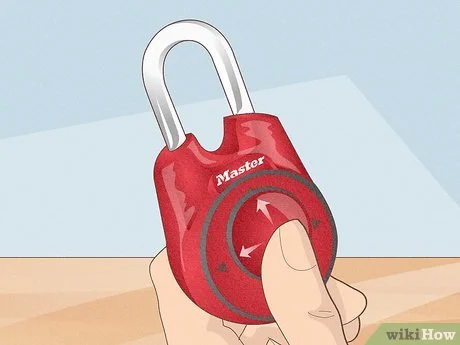
How Do You Reset the Combination on a Master Lock: Resettable combination padlocks (shackle-type) — most common consumer padlocks that let you set your own code. These usually have a shackle you can pull up when the lock is open and a simple mechanical reset action.
-
Resettable 3- or 4-digit combination locks (dial or wheel style) — smaller luggage or locker locks where you set digits instead of turning a dial.
-
Dial-style combination locks (rotary dial) — the classic single-dial locks (found on some padlocks and many school/locker locks). Most of these are not user-resettable.
-
Proprietary / high-security models — some require an included reset tool or code card or must be reprogrammed by the manufacturer.
Key point: You must know the current combination and have the lock open to reset almost any user-resettable Master Lock. If you don’t have the current combo, resetting yourself is usually impossible and attempting unauthorized access is illegal.
How to reset a common shackle-style Master Lock (step-by-step)
This is the typical method used by many Master Lock consumer models (procedures vary slightly by model):
-
Open the lock using the existing combination.
-
Pull up the shackle to the open position.
-
Rotate the shackle — most models require rotating the shackle 90° or 180° away from the locking position. (Exact rotation depends on model; check your manual if available.)
-
Press the shackle down while in the rotated position and hold it down (this engages the reset mode).
-
Set your new combination by turning the dials or setting the numbers to your desired code.
-
Release the shackle and rotate it back to the locked position.
-
Test the new combination several times with the shackle closed to verify it works before using the lock.
-
If the lock has a small reset lever or button (common on 4-digit models), you typically move the lever to the reset position, enter your new code, then return the lever to its original position.
-
Always test the new code multiple times with the shackle closed and open the lock repeatedly to ensure the change “took.”
How to reset 3- or 4-digit Master Lock combination locks (wheel/dial-style)
Many luggage and locker locks use push-button or wheel mechanisms:
-
Reset lever method (wheel locks):
-
Open the lock with the current code.
-
Locate the reset lever (often inside the shackle hole or on the side).
-
Move the lever to the reset position (usually up or down).
-
Set the new digits.
-
Return the lever to its original position.
-
Test the new code.
-
-
Button-based digital/mechanical models:
-
Follow the manufacturer’s printed steps: typically you open, press and hold a reset button, enter new digits, then release.
-
Important: Exact actions (lever direction, rotation degrees) vary by model number. If possible, locate the model number on the lock and consult the Master Lock manual for that model.
When you cannot reset the combination (dial locks and some models)
-
Dial-style rotary combination locks (e.g., traditional single-dial padlocks) are not user-resettable. The factory-set combination cannot be changed without manufacturer intervention or specialized service.
-
If your lock lacks a reset lever, reset button, or shackle rotation option, it is likely non-resettable.
-
For commercial or high-security models, resetting may require a code card, reset tool, or contact with Master Lock.
If you’re unsure whether your model is resettable:
-
Look for a model number on the lock body.
-
Search for the model manual (manufacturer site) or contact Master Lock support.
-
Check packaging or paperwork that came with the lock.
Troubleshooting and common mistakes
-
Lock won’t enter reset mode: Make sure the lock is open and the shackle is fully pulled up. Try rotating the shackle farther (some models require 180°). Don’t force it — forcing may damage the mechanism.
-
New combination doesn’t work: You may not have held the shackle/lever in reset while changing the code or you rotated it back incorrectly. Repeat reset steps exactly and test repeatedly before putting the lock into service.
-
Forgot the current combination: Do not try to guess endlessly. Contact Master Lock customer service or use proof-of-ownership procedures. Attempting to open without authorization can break the lock and may be illegal.
-
Dials misaligned: With wheel locks, ensure all digits are perfectly aligned on the index line. Slight misalignment may prevent opening.
-
Rust or stiffness: Lubricate with a graphite-based lock lubricant (not oil) to restore smooth movement before attempting reset.
Security best practices & when to contact Master Lock
-
Choose a strong combination (avoid obvious sequences like
0000,1234, birthdays). Change codes periodically for sensitive applications. -
Record your combination and store it securely offline — don’t keep it taped to the lock.
-
Test new combinations thoroughly before relying on the lock for security.
-
For lost combinations or non-resettable models: contact Master Lock Customer Service with proof of purchase and lock details. They can advise authorized repair or replacement options.
-
If legal access is required (e.g., property management), follow proper authorization channels — do not attempt destructive entry.
-
Warranty and support: If the lock is defective or jammed under normal use, Master Lock’s warranty/support can help; have the model number and purchase info ready.
Quick reference: Reset checklist
-
✅ Know current combination and have lock open.
-
✅ Identify model type (shackle-reset, lever-reset, dial/non-resettable).
-
✅ Rotate shackle to reset position or move reset lever/button as required.
-
✅ Enter new combination carefully.
-
✅ Return lever/shackle to locked position and test several times.
-
✅ Record combination and store securely.
Legal & safety note
Resetting or attempting to open a Master Lock that you do not own or do not have authorization to access can be illegal. Always ensure you have permission and ownership documentation before attempting resets or entry. If in doubt, contact Master Lock or a licensed locksmith.